
My Fisio Agenda — practice management software for physiotherapy clinics My Fisio Agenda
Clinical records

Physiotherapy clinical records, digital and encrypted

The initial assessment, what you do in every session, the specialist's report and each patient's signed consents, together in a single record. You decide which fields it has, you write your notes on a computer or tablet between patients, and you export it to PDF whenever you need to. 1 month free, no card needed.
✅ Private notes per session ✅ Encrypted, EU-hosted ✅ Fields you choose
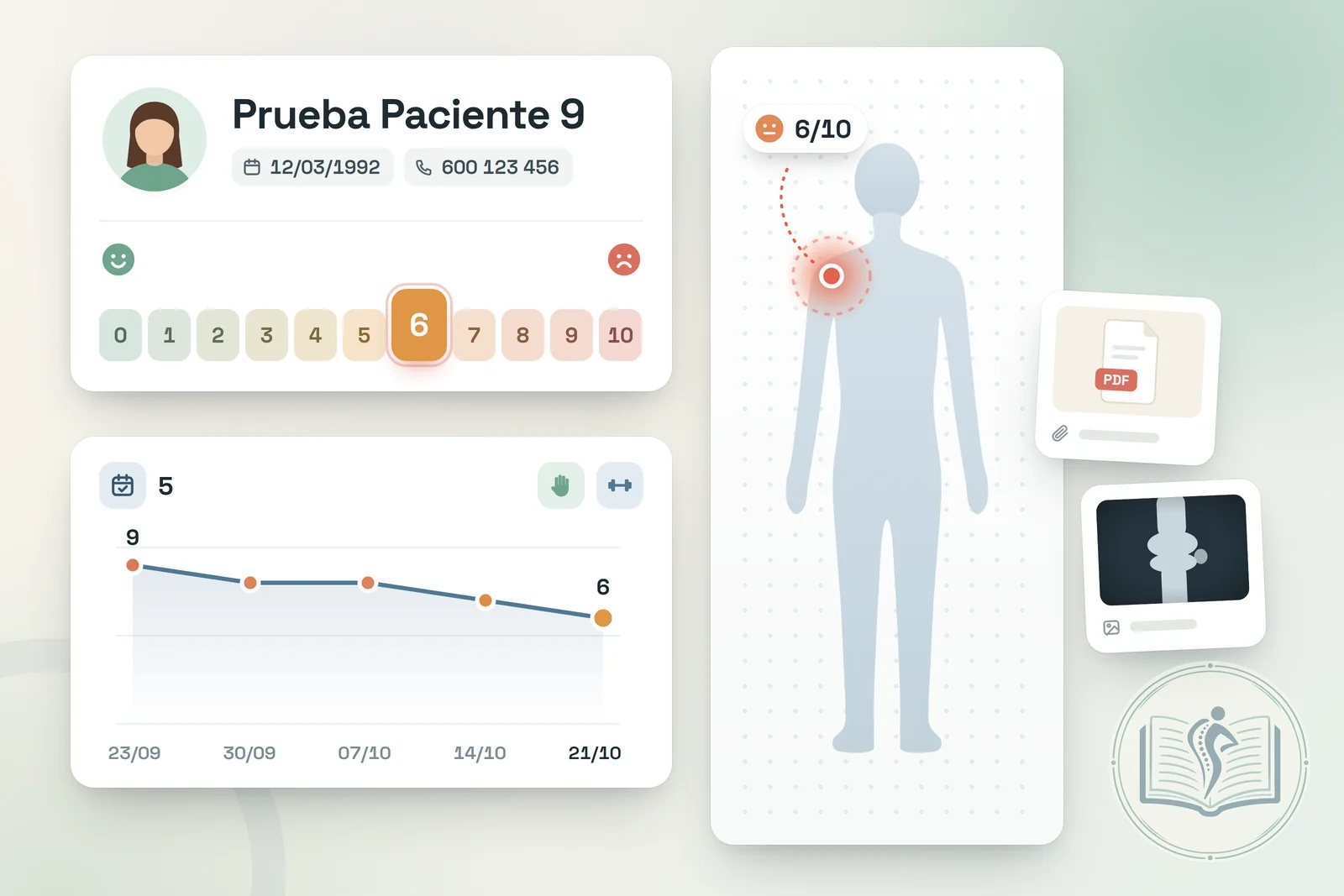
Illustration of a physiotherapy clinical record: patient file with a body chart marking the pain area, a 0-10 pain scale (VAS), progress across sessions and attachments
Day to day

Assessment sheets, USB sticks and notes by the treatment table

In many practices each patient's history is scattered: the assessment sheet in a folder, the MRI they brought on a USB stick, progress notes in a notebook beside the treatment table and the dry needling consent signed on paper. When that person comes back months later with a shoulder relapse, piecing together what was done and how they responded takes longer than the session itself.

On top of that, this is health data, which the GDPR treats as a special category. Digital physiotherapy clinical records let you keep it complete in one place, review it in seconds before the patient walks into the treatment room and store it encrypted, with no papers going astray and no loose files on your desktop.

What's included

A patient record designed for physiotherapy

Everything you need to follow a treatment plan from the first assessment to discharge.

📝

Private notes for every session

Each appointment has its own notes area: technique applied, home exercises prescribed, how the pain has changed. You can also tag the session by type (dry needling, manual techniques, lymphatic drainage, pelvic floor…) and see it later in your statistics.

🧩

Fields you decide

Under “Additional data” you create the fields of your assessment, for example pain area, VAS score, tests performed, medical diagnosis or treatment goals. They can be text, paragraph, number, date, yes/no or option lists, and you can make them mandatory.

📎

Reports and images attached

Upload the specialist's report, the MRI report in PDF or progress photos to the record, up to 25 MB per file. They are private by default; if you want the patient to download, say, their exercise sheet, you make it visible in their space.

✍️

Consents with digital signature

Editable templates the patient signs with a finger on a phone or tablet, including minors through their guardian. The signed PDF is saved in their record. More on informed consent in physiotherapy.

📄

PDF export

Create a PDF of the record choosing what goes in: personal details, additional fields, clinical history, consents, files and, if you wish, the table of completed sessions. Very handy when a patient asks for a summary or moves to another practitioner.

🔒

Encrypted and hosted in the EU

Data travels over HTTPS and is stored encrypted on servers in the European Union, with daily backups that are encrypted too. Even the patient's photo is stored encrypted, never in a public folder.

Step by step

From the first assessment to discharge

1

Before the first visit

Send them a form by link (it expires in 48 h) so they can fill in their details and sign the consent from home.

2

Initial assessment

Complete the fields of your record: pain area, VAS, tests, goals…

3

Every session

Note what you worked on and how the patient responded, and attach reports as they arrive.

4

Review or discharge

Go over their sessions from the patient's list and, if needed, export the record to PDF.

Data protection

What the software provides and what is up to you

Health data calls for care on both sides. This is how the work is shared.

🛡️ What My Fisio Agenda provides

  • Encryption in transit (HTTPS) and at rest, on servers in the European Union (France).
  • Daily backups, also encrypted.
  • Two-step verification by email, a security PIN per section and control of sessions and devices.
  • Activity log and a data processing agreement.

🧑‍⚕️ What is up to you

  • Inform the patient and obtain their consent before processing their data.
  • Record only what care requires and keep it up to date.
  • Keep clinical documentation for as long as required: in Spain, at least five years from the discharge of each care episode under Law 41/2002, unless your autonomous community requires longer.
  • Handle your patients' requests for access, rectification or erasure.

My Fisio Agenda helps you comply with the GDPR and Spain's LOPDGDD, but it does not replace your legal adviser: the end result also depends on how you work. You will find all the technical details under security and data protection.

Frequently asked questions

Questions about physiotherapy clinical records in My Fisio Agenda

What do digital physiotherapy clinical records include?
Everything that used to be on paper: personal and contact details, the initial assessment with the fields you define, notes from every session, the reports and tests the patient brings and the signed consents. In My Fisio Agenda it all lives in the patient record, and you open it from the browser on your computer, tablet or phone.
Can I adapt the record to the way I assess patients?
Yes. In Settings you define the fields of the “Additional data” section: you can create, rename, reorder and remove them, and make them mandatory, as text, paragraph, number, date, yes/no or option list. For example: pain area, VAS score, tests performed, medical diagnosis or treatment goals. The built-in fields (date of birth, address, how they found you and reason for consultation) can also be renamed or removed.
Where do I write the notes for each session?
In the appointment itself, in the “Details / Notes” area, so every note stays tied to its date. From each patient's statistics you see the list of their sessions with date, status and room, and you can open any of them to reread what you wrote. For the overall summary of the case there is also the “Clinical History” field in the record.
Which files can I store and how much space do I get?
PDFs, images, Word or Excel documents and videos, up to 25 MB each. Total space depends on the plan: 20 MB on Semilla, 50 MB on Junior and 200 MB on Senior; at clinics, 50 MB per physiotherapist on Center Mini and 200 MB on the Medium Plan and Center Super. Files are private unless you decide to show them in the patient's space. See plans and pricing.
How does the patient sign the informed consent?
With a finger, on your tablet or on their own phone. You prepare your templates (for example, one for dry needling and another for pelvic floor physiotherapy) and the patient signs them; for minors, the guardian signs. A signed PDF is created, stored in the record and also visible to the patient in their space. We cover it in detail in informed consent in physiotherapy.
Can I export the clinical record as a PDF?
Yes. From the patient record you choose which sections to include (personal details, minor and guardians, additional data, clinical history, consents and files) and, if you like, the table of completed sessions. Every page of the PDF carries a “confidential” notice and its page number in the footer.
Is it safe to keep health data in the cloud?
Everything travels over HTTPS and is stored encrypted on European servers in France, with an encrypted backup every day. You can turn on two-step verification by email, protect sections with a PIN and review open sessions and connected devices. No system is infallible, but this way your records do not depend on a locked cabinet or a spreadsheet without a password. More details under security.
How does it work in a clinic with several physiotherapists?
Each physiotherapist works with their own patients, with their own clinical history, files and additional data. If two practitioners at the clinic treat the same person (say, one for sports physiotherapy and another for pelvic floor), you can duplicate their record: name, phone, photo and consents stay in sync, while each one's clinical notes and appointments remain separate. The clinic can also define “Centre fields” shared by every record. More on our software for physiotherapy clinics.
What if the patient is a minor?
Mark the record as belonging to a minor and add the details of guardian 1 and, if needed, guardian 2. The guardian signs the consent on the minor's behalf, and that is reflected in the signed document.

Your patients' whole history in one place

Clinical records are built into the online scheduling for physiotherapists, alongside WhatsApp reminders, session packs and VeriFactu invoicing, for both self-employed physiotherapists and physiotherapy clinics. 1 month free, no card needed.

Sign up See security